
Everybody is a photography expert and takes lots of photos when they travel. However, few have a good process for documenting the trip, organizing, and preserving their photos. We recently visited the site https://travelwithlolly.com/ and are citing this picture. Like Lolly, we have developed techniques for documenting our travel and will share them in this post.

Contents
- 1 11 Ways to Document Your Travels, and 7 Tips For Improving Your Documentation
- 2 How to Document Your Travels - Our Approach and Opinions
- 3 How to Document Your Travels: Travel Photography
- 4 How to Document Your Travels: Photography Books
- 5 How to Document Your Travels: Travel Photography Blog
- 6 How to Document Your Travels: Travel Apps
- 7 How to Document Your Travels: Travel Mapping
- 8 How to Document Your Travels: Travel Journal
- 9 Conclusion: How to Document Your Travels
11 Ways to Document Your Travels, and 7 Tips For Improving Your Documentation
- Travel Journal: A dedicated journal to record daily experiences, thoughts, and impressions.
- Photography: Capturing moments and places through photos is a popular way to document travels.
- Videography: Creating videos, especially vlogs, allows you to bring your travels to life with moving images and sounds.
- Souvenirs: Collecting tangible items like tickets, maps, or local crafts can evoke memories of your trips.
- Scrapbooking/Photo Books: Compiling photos, tickets, and other mementos into a scrapbook or photo book provides a tangible way to revisit your travels.
- Postcards: Sending postcards to yourself or others can be a fun way to document and share your experiences.
- Travel Blogs: Share your experiences, tips, and insights with a wider audience through a blog.
- Social Media: Platforms like Instagram, Facebook, Pinterest and TikTok allow for instant updates and visual storytelling.
- Travel Apps: Utilize apps like Trip It, Google Photos, Find Penguins, or Pin Traveler to track your route, store photos, and share your journey.
- Travel Mapping: Visualize your travels on a map, whether physical or digital, to see where you've been and plan future adventures.
- Emails to Yourself: Send emails with trip updates to yourself or loved ones as a way to document your experiences.
- Back up your photos and videos: Ensure your memories are safe by backing them up to the cloud or another storage device.
- Take lots of pictures: Don't be afraid to take pictures of everything, even the small details.
- Get in the pictures: Include yourself in some photos to personalize your memories.
- Organize your files: Keep your photos, videos, and other documentation organized for easy access later.
- Don't forget the little things: Keep ticket stubs, maps, and other small items that remind you of your travels.
- Be creative: Experiment with different methods and find what works best for you.
- Be respectful: While there is no absolute set of ethical rules regarding travel photography, certain actions are unethical and can be rude to other tourists.
How to Document Your Travels - Our Approach and Opinions
Of the eleven eleven ways that we cited above for "How to Document Your Travels," we regularly use six of the ways to record our travels. Here is what we do when using the six techniques:
How to Document Your Travels: Travel Photography
Travel Photography is the heart of "How to Document Your Travels." Historically, I took a lot of pictures with my old analog camera, printed them and threw them in a box never to look at them again. Because film cost money, I was cautious in how many pictures I took, and the quality was not very good. Then came the invention of digital cameras, and the cost of film was no longer an issue. So, I took a lot of pictures, but still didn't have a good way to organize them in a logical way. Then came the invention of the iPhone and I no longer needed to log around all my camera equipment as if I was a professional photographer. And, with the recent improvements the photography on the iPhone has not only gotten easier, but the quality is fantastic.
Travel Photography Tools
We find that in posting our pictures to either our blog or to social media we usually have to do a fair amount of editing. Cropping and resizing the pictures is often necessary. Unfortunately, the iPhone pictures have too many pixels to store online. Downloading our photos and editing them to a smaller size is easily performed with the windows image editor. I first used Adobe and other tools to resize the photos, but clearly after I download them into windows, I can easily resize at the same time.
While Cos is not a photography expert, he owns a really nice 35mm digital camera from Canon. However, in our effort to reduce the amount of stuff we need to pack, the camera and its assorted lenses are often left home. We are finding that we can really take great photos with our mobile phones. Cos and Robin both have iPhones. We find the Apple ecosystem to be able to meet all our photographic needs with one exception: taking tele-photic pictures. You just can't get a good high resolution long-distance picture with the phone.
However, the good news is that there are plenty of other features, like the Pano-feature. It makes it easy to take wide-angle high-quality pictures. In addition, while talking about Apple Products, we need to also give them a plug for their EarPods and AirPods. We have upgraded to the AirPods Pro which has noise cancelling and hearing aid features. They are also much easier to bring with you on those long flights. You can find out more about the iPhone, and other Apple Products here: apple.com.
How to Document Your Travels: Photography Books
Facebook or Instagram can be a great online tool to record your experiences. However, our favorite way to remember our trips is to document them in a photo book or post them to this blog. If you are like us, you have plenty of old, pre-digital pictures stored away in your attic. Perhaps in a traditional photo album or even a shoe box that you haven't looked at in ages. We have found that making photo books, not only is fun, but we actually go back and look at them. The whole process of taking and recording the pictures has actually helped improve our photo taking skills.
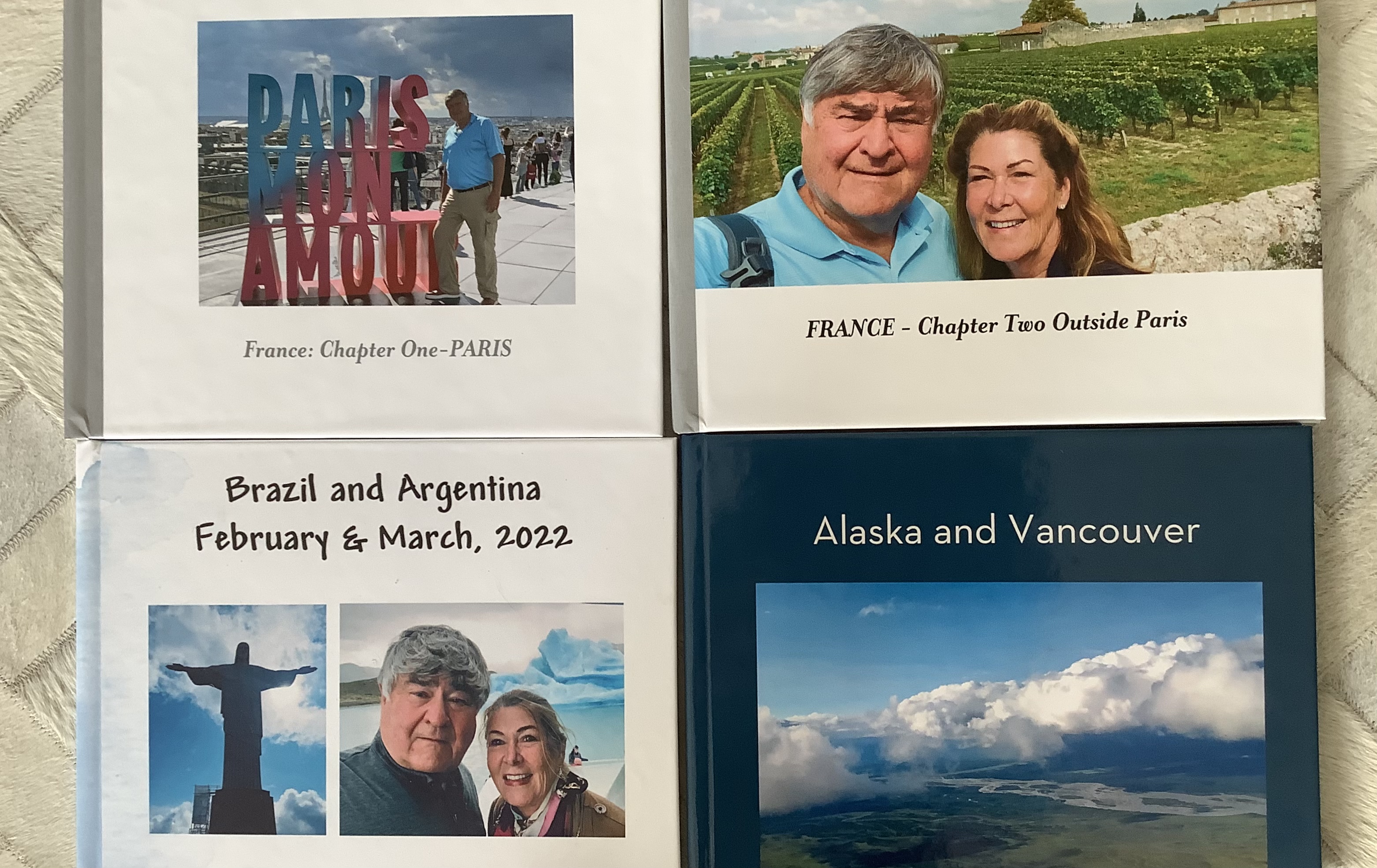
While there are many ways to build your photo book, we have always recommended Shutterfly. All of the examples above are from Shutterfly. We find their services to be excellent. They charge a fair price based on the number of pages in the book. They turn the book around quickly, and the quality of the books is excellent. Shutterfly and other companies offer many other ways to record your digital photos including calendars and other kinds of gifts. Like a lot of online tools, there is a learning curve to use Shutterfly. It can take a little while to get comfortable with the tool. You can access the Shutterfly website here: shutterfly.com.
Recently we were introduced to an app called FindPenguins. We religiously added our photos, documentary and comments into their app for every new place we visited. Each place is a called a footprint. We included up to 20 photos for each footprint. Our followers were able to keep up with our travels and often commented on the places we visited. Both of us were able to add photos. At the end of the trip, you have an option to create a book. It was ridiculously easy. Even the editing was easy. So for our 72 day trip to Asia, we created two books which we adore. See the results below!


How to Document Your Travels: Travel Photography Blog
Needless to say, you are reading our Travel Photography Blog. We find it a great way to Document our travels and share our experiences with others. WordPress is a neat tool to help build the blog, but it like most tools takes some time to learn the tricks. We are still learning and getting better everyday.
How to Document Your Travels: Travel Apps
We have two travel apps that we couldn't live without. The first is Trip-It which is a great itinerary planning tool and an affective AI tool for keeping track of any changes that may be made by airlines and hotels. The second tool is FindPenguins which we mentioned earlier and is a great way for organizing our photos and producing our travel photo books.
How to Document Your Travels: Travel Mapping
Cos is a map person. He has a giant map in his office showing all the places we have visited and plan to visit.

How to Document Your Travels: Travel Journal
Many people like to keep a hard-copy travel journey. Robin and Cos don't personally document much in a hard-copy written travel journal. Instead, as we noted previously, we document our trips using Trip-It. For more information about Trip-it please see our Planning Tools post. We find that saving our Trip-it itineraries and our photo books does a pretty good job of documenting our trips. However, if you want to document the unusual things that you have done or seen, then you should consider a travel journal. If you are looking for a travel journal, we have found some really nice travel logs at Amazon.

Check out the Travel Journals and Logs on Amazon. Great books, good prices. Shopping on Amazon is fast and easy.
Conclusion: How to Document Your Travels
While it take sometime and some organization to document your travels, we find great fun and joy in being able to look back and remind ourselves of the great times we had on our travels. It not only gives us a way to remember the wonderful trips that we have taken, but it also helps us plan our next adventure. We highly recommend that you invest the time to document your travels.
Travel smarter, dine better and explore deeper: we'd love to share our handpicked insights and exclusive guides in our monthly newsletter below.
0 Comments